Your private AI writer for Mac
No subscription. Live transcription and translation, unlimited meeting notes, and smart questions to ask while the meeting is still going, .
Just works. Right on your Mac. Speak naturally. Parlin cleans up your words for emails, messages, and documents.

Parlin for Mac
The main app. Dictation, transcripts, notes.
Needs an Apple Silicon Mac (M1 or later) on macOS 14.6 or newer.Intel Macs are not supported.
$69$39 onceSave $30
Up to 3 of your own Macs.
One license per person. Not for sharing.
Launch discount ends October 31, 2026.
No system-wide dictation or video-link transcription. Choose direct for every feature.
Away from your Mac?
Keep recording.
Parlin Recorder is a free iPhone app that goes with Parlin for Mac. Record meetings, lectures, and ideas on your phone, then send them to your Mac with one tap.

Parlin Recorder
Free iPhone companion to Parlin for Mac.
Record on the go when your Mac isn’t with you. One tap sends the recording to your Mac.
- Built for macOS
- macOS 14.6 or later
- Apple Silicon
- M1 or later, no Intel
- Local processing
- audio stays on your Mac
- Built-in AI
- speech and cleanup, technical details
One app, every job
Parlin for Mac in 40 seconds
What the video shows, as narrated:
Parlin gives you six voice tools in one Mac app.
It stays private, with no cloud and no account.
It works on any Mac with Apple Silicon, from an M1 with 8 GB of memory to the newest models.
You pay once, with no subscription.
Hold the Fn key and talk.
Speak, and you get clean, polished text.
It types right at your cursor, in any app.
It works in 99 languages.
Get meeting notes that show who said what, and the next question to ask.
Your words never leave your Mac.
Transcribe files and video links, then translate and share them.
Try Parlin today at getparlin.com.
Speak once. Parlin does the rest.
Write smarter with AI
Just speak. The AI cleans up your words as you go.
99 languages
Dictate in any of them, all on your Mac.
Live transcription & translation
See your speech as text, with translation into your chosen language.
Unlimited meeting notes
Notes and summaries, plus suggested questions shown live during your meeting.
Your recordings, organized
Keep recordings and transcripts together. Organize documents into folders.
Private and offline
Audio and text stay on your Mac. No subscription.
Local files and online links
Transcribe local audio and video files, plus supported online links such as YouTube and Instagram Reels. Link imports require the direct version.
Simple to start. Yours to tune.
Use the built-in AI or fine-tune your settings. The direct version also supports compatible local Ollama models.
Edit, export, share
Edit your meeting notes in Parlin. Export PDFs or Markdown, and save transcripts as SRT subtitles.
Real support and updates
We ship often and we answer.
Remix · repurpose
Turn transcripts into new drafts.
Rewrite a transcript in a casual, professional, energetic, or concise tone. Working with your own video? Export a copy with the rewritten text as captions. The original footage and audio stay unchanged.
Your take
“okay so um, the pricing page is basically where you, you lose most people”
Remixed · Casual
“So here's the thing: your pricing page is where you lose most people.”
Video export requires the source video. Link imports require the direct version.
So here's the thing: your pricing page is where you lose most people.
Illustrative caption preview
Your voice workflow.One purchase.
From the first recording to the finished document, manage it all in Parlin.
- One dashboard for your work
- Keep recordings, transcripts, and documents together. Use folders to find what you need.
- Notes you can make your own
- Edit your meeting notes, refine the wording, and keep the details that matter.
- Ready to share
- Export polished PDFs or Markdown documents. Save transcripts as SRT or VTT subtitles.
- Simple defaults. Room to customize.
- Start with the built-in AI. For more control, the direct version detects compatible installed models when Ollama is running locally.
Try Parlin with your own work
No card for the trial. $39 once. Launch discount ends October 31, 2026. Regular price $69. No subscription.
What's inside · teardown
The whole stack, layer by layer.
Hold Fn, talk, and clean text lands in any app. Scroll to pull Parlin apart and meet the three layers that pull it off, all on your Mac.
Your words never leave your Mac.
Cloud dictation apps stream your voice to a server they own. Parlin runs speech and cleanup on your Mac, so there's no audio to send anywhere.
Cloud processing
- You talk into your mic
- Your audio gets uploaded to their server
- Their model runs it in their data center
- Storage and retention depend on the provider
Parlin
- You talk into your mic
- A local speech engine turns it into text on your Mac
- Cleanup AI runs on your Mac too
- Audio and text stay on your disk. No upload, ever.
The app sends no audio, transcripts, or usage analytics. After the models are installed, transcription and cleanup work without Wi-Fi. Your recordings and transcripts are stored on your Mac, where you decide what to keep and share.
See it in motion
Voice in. Clean text out.
Four phases, start to finish. Hold Fn, talk, watch the words land, then watch the cleanup tidy them. The whole loop runs on your Mac.
You talk.
Hold Fn and speak. The audio stays on your Mac.
Works everywhere
One shortcut. Every app you type into.
Parlin is not a writing app you switch into. Hold Fn wherever your cursor already is and the cleaned text lands right there. Mail, your editor, the URL bar, a Slack reply, a Notion page. If you can type in it, you can talk into it.
What it looks like in practice
- Pasted into MailYou said
“send the proposal to legal by friday”
Typed for youSend the proposal to Legal by Friday.
- Pasted into SlackYou said
“merged the auth fix can you review”
Typed for youMerged the auth fix. Can you review?
- Pasted into NotionYou said
“spec update we're moving the onboarding step to after signup”
Typed for youSpec update: we're moving the onboarding step to after signup.
- Pasted into CalendarYou said
“lunch with mom tuesday at noon”
Typed for youLunch with mom, Tuesday at noon.
App names and logos are trademarks of their respective owners. Parlin is not affiliated with or endorsed by any of them.
Parlin Recorder for iPhone
Record on the go. Make it useful on your Mac.
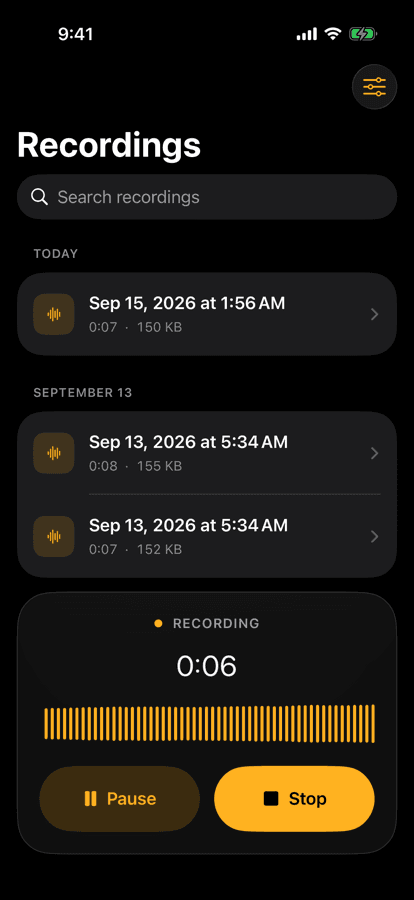
Good ideas don't wait until you're at your desk. We built Parlin Recorder, a free iPhone app, to capture clear audio wherever you are. When you're back at your Mac, turn it into notes you can use.
Record on the go
Capture meetings, lectures, discussions, and voice notes in high quality with the free iPhone app.
Send it to your Mac
Transfer your recording with AirDrop, then open it in Parlin. Your audio goes directly from your iPhone to your Mac.
Turn recordings into useful documents
Use Parlin for Mac to create transcripts, summaries, key points, action items, and shareable PDFs. Processing stays on your Mac.

Get the free iPhone app
Parlin Recorder on the App Store.

Parlin Recorder is the free iPhone companion to Parlin for Mac, and it also works on its own. Parlin for Mac has a 7-day free trial.
The cleanup philosophy
Your voice. Just better written.
Keep your wording and tidy the grammar, capitals, and punctuation. Choose Exact mode when you want Parlin to stay close to what you said.
Switch without opening a menu: while you hold Fn, add Shift for your exact words, or Cmd for a short summary of what you said.
Cleanup example. You said: hey priya can we meet on friday thanks. Parlin adds capitalization and punctuation: Hey Priya, can we meet on Friday? Thanks!
Illustrative example. Your words, with capitals and punctuation cleaned up.
hey could you send me the report once you're done i also need the spreadsheet from priya by friday thanks
Hey, could you send me the report once you're done? I also need the spreadsheet from Priya by Friday. Thanks!
Same words, same intent. Punctuation added, capitalization fixed, no rewriting.
More things it cleans
- GrammarYou said
the report and the spreadsheet is ready
Parlin typedThe report and the spreadsheet are ready.
- CodeYou said
chmod six four four dot env
Parlin typedchmod 644 .env
- Names and timeYou said
schedule a call with priya tuesday at three
Parlin typedSchedule a call with Priya Tuesday at 3.
One-time model setup
Parlin downloads the cleanup model for you.
Follow the first-run prompts. Once the model is installed, cleanup works offline. No API key required.
Multilingual · 99 languages
Talk in your language. Keep your meaning.
Transcribe in 99 languages on your Mac. Choose a language or use automatic detection, and translate your words when you need to. Results vary by language and recording quality.
And dozens more, all 99 in Settings
- Afrikaans
- Albanian
- Armenian
- Azerbaijani
- Bengali
- Bulgarian
- Catalan
- Croatian
- Czech
- Danish
- Estonian
- Finnish
- Georgian
- Greek
- Hungarian
- Icelandic
- Kannada
- Kazakh
- Latvian
- Lithuanian
- Malay
- Malayalam
- Marathi
- Norwegian
- Romanian
- Serbian
- Slovak
- Slovenian
- Swahili
- Swedish
- Tagalog
- Tamil
- Telugu
- Thai
- Urdu
- Welsh
Pick the language per recording in Settings, or let auto-detect handle it.
Before you buy
The questions that actually matter.
Will it run on my Mac?
Parlin requires an Apple Silicon Mac (M1 or newer) running macOS 14.6 or later. Intel Macs and Windows PCs are not supported.
Is my dictation private?
Built-in speech recognition and AI cleanup run locally on your Mac. Parlin does not upload your audio or transcripts for processing. You choose when to export or share your work.
Does it work offline?
Dictation, local-file transcription, and built-in AI work offline once the required models are installed. Initial downloads, importing online video links, purchasing, and checking for updates need internet access.
Do I need a subscription, account, or API key?
No subscription, Parlin account, or API key is required. The launch price is $39 once until October 31, 2026, then $69. Updates within the major version you purchase are included; future major upgrades may be priced separately.
Can I use my license on more than one Mac?
Yes. A direct license covers up to 3 of your own Macs. It belongs to one person and cannot be shared with other people. Teams need a separate license for each person.
Should I download direct or buy on the App Store?
Choose the direct version for every feature, including dictation into other apps, video-link imports, and compatible local Ollama models. The Mac App Store version has fewer features because of Apple’s sandbox restrictions. Already bought through Apple? Email your receipt to support@devxgroup.io for a free direct license.
Can I transcribe local files and online links?
Both versions transcribe supported local audio and video files. The direct version also imports supported online links, including YouTube and Instagram Reels, using a download helper. Private or restricted links may not work. Captioned video export requires the source video.
What happens when the 7-day trial ends?
The direct version includes a 7-day trial with no credit card required. Afterward, buy a license to continue using the paid features. There is no automatic charge. The website asks for your name and email before the trial download.
Is the iPhone app the same as Parlin for Mac?
No. Parlin Recorder is the free iPhone companion to Parlin for Mac. It records and transcribes on your iPhone, then sends recordings to your Mac with AirDrop, where Parlin for Mac organizes them and turns them into notes and summaries. Parlin for Mac is bought on its own, and each app also works by itself.
Can I buy Parlin for my team or company?
Yes. Team pricing starts at 5 seats. Discuss the agreement and payment with us first; each paid seat gets a separate key for one person and 1 active Mac. Release a working Mac before moving the key, or contact us if it is lost or stolen. Individual direct licenses still cover up to 3 Macs.
Something else on your mind? Email support@devxgroup.io and a human answers.
Pricing
Buy it once. Keep it forever.
Try the direct version free for 7 days. No credit card or account. Buy once for $39, with updates included within the current major version. Choose direct for every feature, or the App Store version if you prefer to buy through Apple.
Works on a Mac with an M1 chip or newer · macOS 14.6 or newer
On an Intel Mac or Windows? Email support@devxgroup.io. We track demand by hand and we'll let you know if we ship it.
ONE-TIME
App Store
Limited features due to Apple's restrictions.
$39paid onceSave $30 · Promotional launch price until Oct 31, 2026then
$69- Built-in AI cleanup
- Local transcription (on your Mac)
- Language picker
- Transcript export (TXT, SRT, VTT)
- In-window hold-to-talk shortcut
- Menu bar item
- Start dictation with Apple Shortcuts
Buy through Apple if you do not need dictation into other apps or video-link imports.
Buy on the App Store- Recommended
ONE-TIME · EVERY FEATURE
Direct
Types into any app on your Mac. Global shortcuts, video-link imports, automatic text insertion.
$39paid onceSave $30 · Promotional launch price until Oct 31, 2026then
$69- Everything in the App Store version
- Global hold-to-talk from any app
- Auto-paste into focused field after dictation
- Streaming dictation
- Transcribe a YouTube, Instagram, or TikTok link
- Import and convert supported audio and video files
- Advanced: bring your own Ollama LLM model
- One-click app updates
- Use on up to 3 of your own Macs
- All sales final (statutory rights preserved)
The complete version, including dictation into other apps and video-link imports.
Apple Silicon only · M1 or later
Teams and companies
From $59 a seat for 5 or more, down to $28 at 200. Quotes from 25 seats, with a signed DPA and an installer your MDM can push. Discuss the agreement and payment with us first. Each paid seat gets one key for one person and 1 active Mac.
Compare every feature
Choose the version that fits.
Both versions manage the local cleanup model and process audio and transcripts on your Mac. The direct version adds features Apple's sandbox does not allow. Same price either way.
| Feature | App Store$39 paid once | DirectFull power$39 paid once |
|---|---|---|
| Both versions. | ||
| Built-in AI cleanup | ||
| Local transcription (on your Mac) | ||
| Meeting recording + speaker notes | ||
| File transcription (audio and video) | ||
| Live transcription view | ||
| Translate to another language | ||
| Language picker (99 languages) | ||
| Transcript export (TXT, SRT, VTT) | ||
| In-window hold-to-talk shortcut | ||
| Menu bar item | ||
| Start Dictation App Intent (Shortcuts.app) | ||
| Window menu reopen | ||
| Direct only. | ||
| Global hold-to-talk from any app | ||
| Auto-paste into focused field after dictation | ||
| Streaming dictation | ||
| Import YouTube, Instagram, and TikTok linksNeeds yt-dlp, a free helper you install once. Files you drag in need no setup. | ||
| Additional media format conversion | ||
| Advanced: use your own local Ollama model | ||
| App updates | Via App Store | In-app, one click |
| License works on | All your Macs (same Apple ID) | 3 Macs |
| Refund window | Apple's policy | All sales final |